English 
LDPlayer Remote Control
PC Remote Control
What should I do if the screen goes black after clicking on a PC game window?What should I do if my OSLink remote connection shows as offline? This article will introduce how to check this yourself.How to Check Who Accessed the Shared LD Player/Desktop?How to fix a blurry computer screen display? One trick to teach you self-examinationRemote LD Player/computer desktop, how to exit full screen when entering the big screen?What to do when keymaps are not working during PC mode?
PC to Phone & Phone to Phone
How to run multiple games on a mobile phone? Which mobile game multi-account software is the best?How to remotely control a mobile phone from a computerHow to remotely control another phone using a mobile phone?No "Allow USB debugging" Prompt in Win7 SystemHow to Remote Control an Android Phone from Another Phone?How to Enable Game Mode on Phone via PCHow to Mirror Phone Screen to PC?
Remote PC Gaming
How to customize button configuration in PC gaming mode?Why Does the Screen Go Black After Clicking on the Game Window on App?How to Solve the Problem That the Controller Cannot be Used in PC Game Mode?How to Solve the Problem of Inoperable Buttons in PC Games?How to Play PC Games Remotely on Your Phone? It Comes with Built-In Key Mapping and Supports External Devices!
Security & Permissions
No "Allow USB debugging" Prompt in Win7 System
2026-07-21
Since the win7 system does not come with an adb driver, if you want to successfully cast your phone to the computer, you need to install the adb driver.
Specific methods:
1. Download ADB on the computer and install it
Download address:
2. Plug the phone into the computer, select the file transfer mode, and ensure that the developer mode and USB debugging are turned on.
3. Open ADBDriverInstaller.exe, click Refresh to refresh the list, then select your phone in the list, and finally click [Install] in the lower right corner
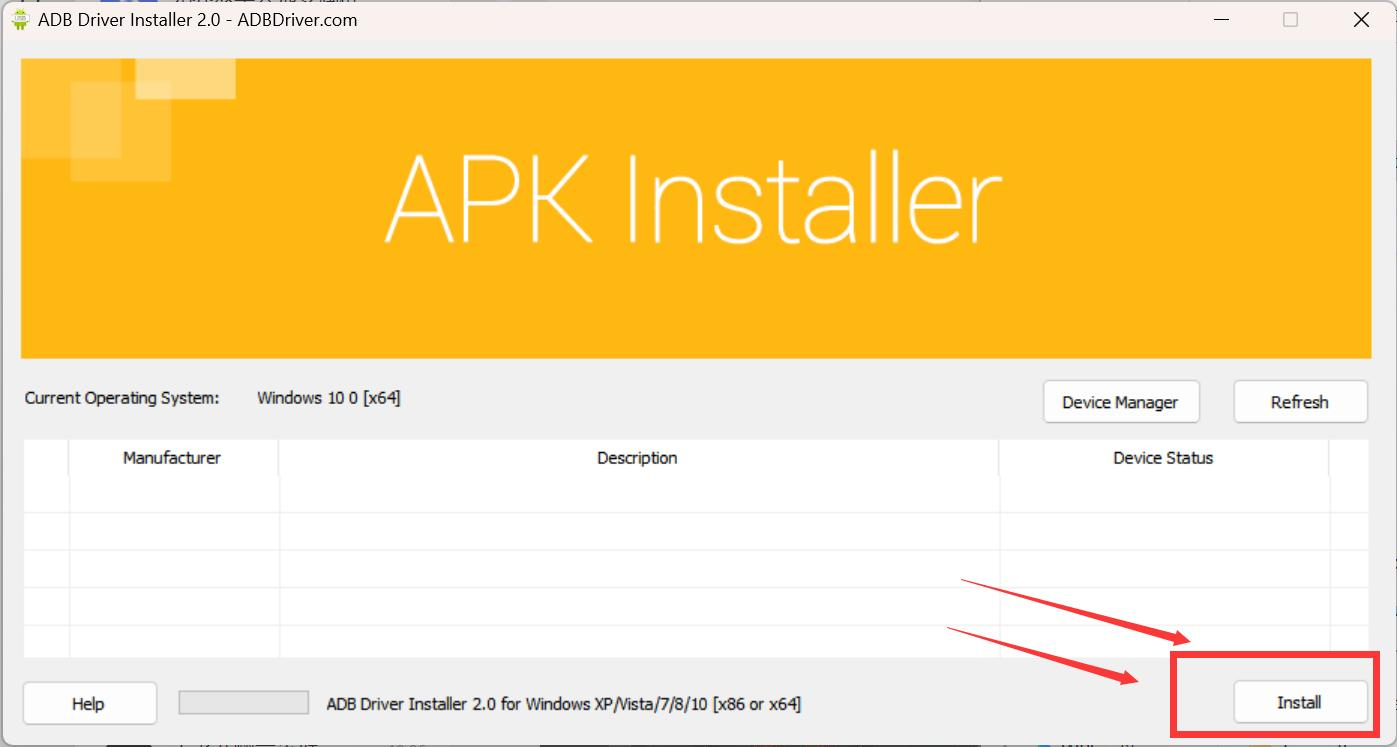
4. After finishing it, go to the main page of OSLink computer again, click Screen Mirroring, and go through the process of turning on screen